Ground segment nominal UTC ----.--.-- --:--:--

Products

Two products sit on one spacecraft registry. Telemetry Hub is the data plane. Mission Control is the control plane. Neither requires the other to run, and operators rarely buy only one.

Data plane

Telemetry Hub

Receives transport frames from your ground stations, validates and decodes them against your mission dictionary, and stores both the decoded parameters and the untouched frame. Answers queries over parameter history and keeps the raw record retrievable for as long as you need it.

  • CCSDS 133.0-B transport frames and space packets
  • CDF, CSV and Parquet output, on demand or scheduled
  • AWS, GCP or S3-compatible object storage
Telemetry Hub details
Control plane

Mission Control

Owns the operational picture: contact windows, uplink command queues, downlink priorities, alert rules and the people allowed to act on them. Built for operators who cannot afford a lost pass to go unnoticed.

  • Contact windows from your elements and your stations
  • Roles, per-spacecraft grants and an audit log
  • Alert rules on decoded engineering values
Mission Control details

What each product is responsible for

The division is deliberate. Data handling and operational control have different failure modes, different audit requirements and different on-call rotations, and merging them into one surface makes both harder to reason about.

CapabilityTelemetry HubMission Control
Ground station ingestCoreReads pass state from Hub
Frame validation and decodingCore—
Parameter history and queriesCoreDashboard views over Hub
Object storage exportCore—
Contact window computationElement uploadCore
Uplink command queue and approval—Core
Downlink priority per spacecraftStorage tieringCore
Threshold and gap alertingRule evaluationCore
Roles, grants, audit logService accountsCore
Data retention90 days included, extendableConfiguration only

Why operators end up with both

Telemetry without a plan is a filing cabinet. A plan without telemetry is a spreadsheet. The products are useful apart and coherent together.
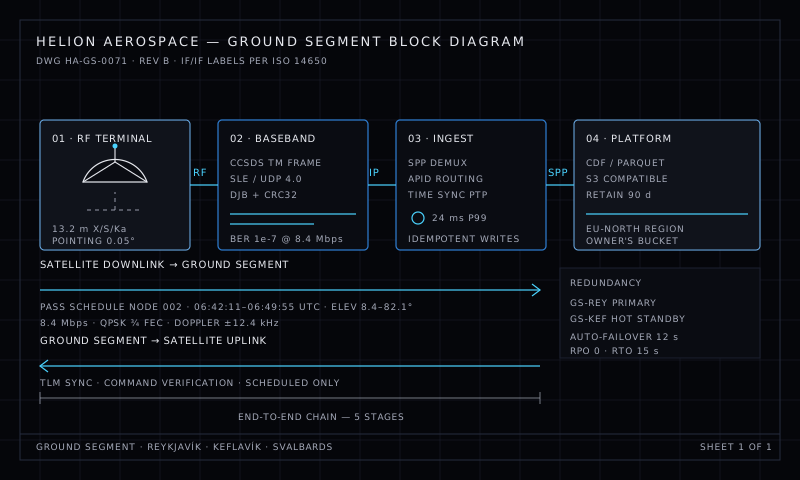
Ground segment block diagram showing RF terminal, baseband, ingest and platform stages

The shared spacecraft registry

Every spacecraft is described once: its COSPAR identifier, its buses, the APIDs it emits, the parameters those APIDs carry and their units, the elevation masks it is flown against and the ground stations it can reach. Telemetry Hub resolves incoming packets against that description. Mission Control computes windows against it. A change to an APID map is a change in one place.

  • One registry entry per spacecraft, versioned with a diff log
  • APID maps that accept ranges and masks, not just fixed values
  • Units declared at the parameter level, converted at query time
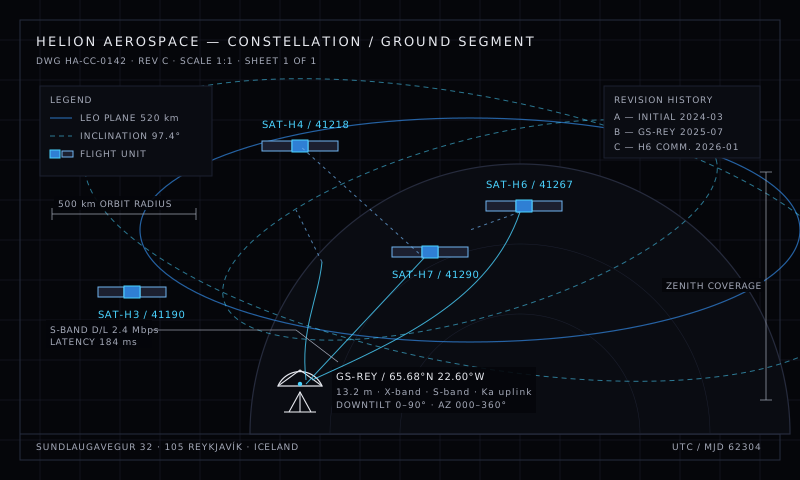
Constellation schematic with orbital planes, satellites and a ground station

One clock across both products

Telemetry timestamps are not the moment Helion received a frame. They are the spacecraft clock value carried inside the frame, corrected by the offset Helion maintains per spacecraft and per station. The receive time is kept alongside it, never instead of it. When an operator compares two spacecraft against a thermal event, both timelines refer to the same instant.

  • Spacecraft time preserved separately from station receive time
  • Per-station clock offset measured continuously, not assumed
  • Offsets visible in the audit log with the measurement that produced them

Deployment

Helion is a hosted service. There is nothing to install on the spacecraft, and nothing to install on the station beyond an outbound stream.

01 / STATION

Stream out, do not listen in

Your station opens an outbound TLS connection to a Helion ingest endpoint. No inbound firewall rules on your side, no VPN, no SSH. Station credentials are scoped to the spacecraft they are authorised to send.

02 / REGISTRY

Describe the spacecraft once

Register the bus, the APID map and the parameters. Helion validates incoming packets against it immediately, which turns a misconfigured map into an error at the first pass rather than a silent gap in a month of data.

03 / PLAN

Publish the window catalogue

Upload elements, choose stations, set the elevation mask. Contact windows appear with acquisition, loss of signal and usable duration, recomputed whenever the elements change.

On-premises option. Operators who cannot send telemetry off-site can request the self-hosted collector, which runs in their facility and forwards to Helion over a link they control. It is available on annual agreements and carries the same decoder as the hosted path, so behaviour does not diverge between environments.

Pick the plane that matters to you first

Most teams start with Telemetry Hub because the pain is immediate and the data is already flowing. Mission Control tends to follow once the archive is trusted.